> ## Documentation Index
> Fetch the complete documentation index at: https://arizeai-433a7140-ehutt-trail-benchmark-new-tasks.mintlify.site/llms.txt
> Use this file to discover all available pages before exploring further.
# OpenInference Span Kinds
> The eleven OpenInference span kinds — LLM, Tool, Agent, Chain, Retriever, and the rest — with the canonical attributes Phoenix expects on each.
A **span kind** is the category of operation a span represents. OpenTelemetry has its own span kinds for network calls (`SERVER`, `CLIENT`, `PRODUCER`, ...). OpenInference adds an AI-specific set: LLM, Tool, Agent, Chain, Retriever, and more.
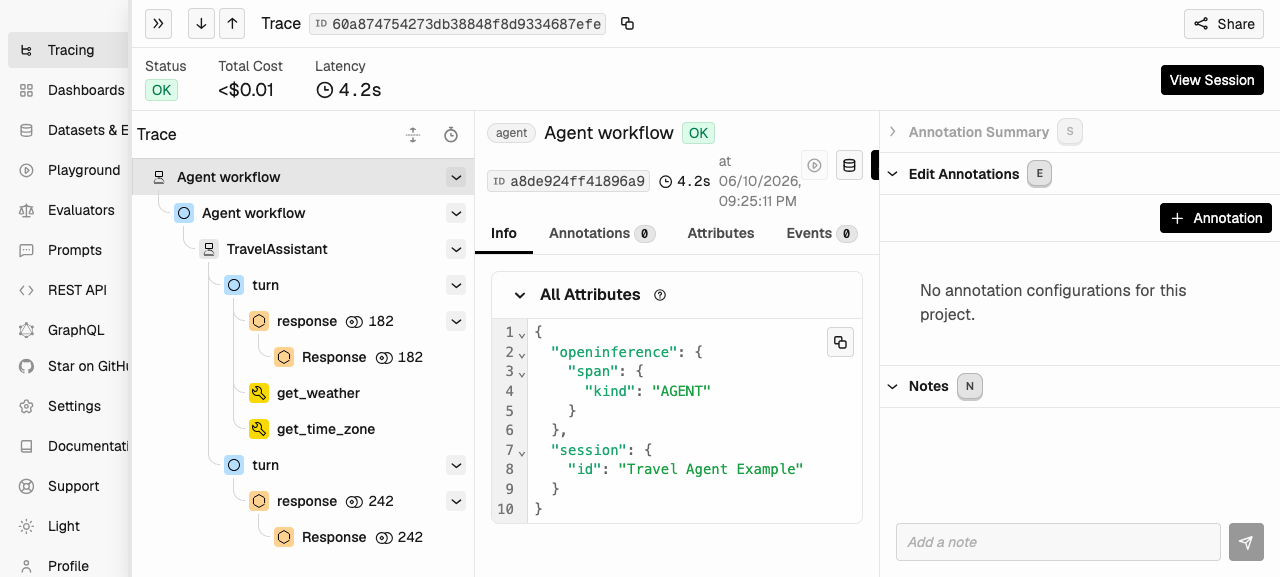
Span kind is what drives the span-kind icons in the Phoenix UI. It's also how Phoenix knows which attributes to expect — an LLM span gets a different visual treatment from a tool span.
# Setting the Span Kind
Span kind is set via the `openinference.span.kind` attribute. **The value is ALL CAPS** — `"TOOL"`, not `"Tool"`. Casing matters: the canonical OpenInference Python enum is `OpenInferenceSpanKindValues.TOOL = "TOOL"`.
```python theme={null}
from openinference.semconv.trace import (
SpanAttributes,
OpenInferenceSpanKindValues,
)
span.set_attribute(
SpanAttributes.OPENINFERENCE_SPAN_KIND,
OpenInferenceSpanKindValues.TOOL.value,
)
```
**Phoenix UI behavior**: span-kind icons in Phoenix trace tree come directly from the `openinference.span.kind` attribute. A span without that attribute renders with a blank icon. Auto-instrumentors set this for you — set it explicitly on every manual span.
# The Eleven Span Kinds
OpenInference defines eleven span-kind values. The first four (LLM, Chain, Agent, Tool) are the ones you'll encounter most often:
| Icon | Span kind | Description |
| :-: | :- | :- |
|  | **`LLM`** | A call to a large language model. |
|
| **`LLM`** | A call to a large language model. |
|  | **`CHAIN`** | A starting point or a link between different LLM application steps. |
|
| **`CHAIN`** | A starting point or a link between different LLM application steps. |
|  | **`AGENT`** | A span that encompasses calls to LLMs and tools — typically the top-level wrapper for an agent loop. |
|
| **`AGENT`** | A span that encompasses calls to LLMs and tools — typically the top-level wrapper for an agent loop. |
|  | **`TOOL`** | A span that represents a call to an external tool, API, or function on behalf of an LLM. |
|
| **`TOOL`** | A span that represents a call to an external tool, API, or function on behalf of an LLM. |
|  | **`RETRIEVER`** | A data retrieval query for context from a datastore (e.g., a vector DB query). |
|
| **`RETRIEVER`** | A data retrieval query for context from a datastore (e.g., a vector DB query). |
|  | **`EMBEDDING`** | An encoding of unstructured data into a vector. |
|
| **`EMBEDDING`** | An encoding of unstructured data into a vector. |
|  | **`RERANKER`** | A relevance-based re-ordering of documents. |
|
| **`RERANKER`** | A relevance-based re-ordering of documents. |
|  | **`GUARDRAIL`** | A validation of LLM input or output for safety, policy, or compliance. |
|
| **`GUARDRAIL`** | A validation of LLM input or output for safety, policy, or compliance. |
|  | **`EVALUATOR`** | An evaluation process — the type, configuration, and results. |
| | **`PROMPT`** | A span representing prompt construction or templating. |
| | **`UNKNOWN`** | Default when no kind is set explicitly. |
# Common Attributes Across All Kinds
These attributes apply to every span kind. Auto-instrumentors set them automatically; set them yourself on every manual span:
| Attribute | Purpose |
| :- | :- |
| `openinference.span.kind` | The span kind (ALL CAPS — e.g., `"LLM"`). |
| `input.value` | The span's input. Free-form string or serialized JSON. |
| `input.mime_type` | `"text/plain"` (default) or `"application/json"`. The TS semconv also defines `"audio/wav"`. |
| `output.value` | The span's output. |
| `output.mime_type` | `"text/plain"` (default) or `"application/json"`. The TS semconv also defines `"audio/wav"`. |
| `metadata` | Arbitrary JSON-stringified metadata. |
| `session.id` | Groups traces into a session. See [Sessions](/docs/phoenix/tracing/how-to-tracing/setup-tracing/setup-sessions). |
| `user.id` | The user the request belongs to. |
| `tag.tags` | A list of tags for filtering and search. |
**Phoenix UI behavior**: Phoenix reads the trace-level input and output from the **root span's** `input.value` and `output.value`. If your root span doesn't set them, the trace list view shows those columns as blank even if child spans have data.
# Per-Kind Attributes
The four most-used kinds have a richer attribute set. The full list lives in the [OpenInference semantic conventions](https://github.com/Arize-ai/openinference/blob/main/python/openinference-semantic-conventions/src/openinference/semconv/trace/__init__.py) — the tables below are a summary.
## LLM
A call to a large language model.
| Attribute | Description |
| :- | :- |
| `llm.model_name` | The model identifier (e.g., `gpt-4o`, `claude-3-5-sonnet-20241022`). |
| `llm.provider` | The provider (e.g. `openai`, `anthropic`, `mistralai`). |
| `llm.system` | The underlying LLM system, when distinct from `provider`. |
| `llm.input_messages` | The chat history sent to the model. |
| `llm.output_messages` | The model's response messages. |
| `llm.invocation_parameters` | Temperature, top-p, max tokens, etc. (JSON-stringified). |
| `llm.tools` | Tool definitions exposed to the model. |
| `llm.function_call` | Function call returned by the model (legacy). |
| `llm.prompts` | The raw prompts sent (for completion-style APIs). |
| `llm.choices` | The choices returned by the model. |
| `llm.prompt_template.template` | The prompt template before variable substitution. |
| `llm.prompt_template.variables` | The variables substituted into the template. |
| `llm.prompt_template.version` | A version identifier for the template. |
| `llm.token_count.total` | Total tokens. |
| `llm.token_count.prompt` | Prompt tokens. |
| `llm.token_count.completion` | Completion tokens. |
| `llm.token_count.prompt_details.*` | Breakdown of prompt tokens (cached, audio, etc.). |
| `llm.token_count.completion_details.*` | Breakdown of completion tokens. |
| `llm.cost.total` | Total cost. |
| `llm.cost.prompt`, `llm.cost.completion` | Per-direction cost. |
| `llm.cost.*_details.*` | Breakdown of cost by token type. |
| `llm.finish_reason` | Why the model stopped generating (`stop`, `length`, `tool_calls`, ...). |
## TOOL
A call to an external tool, API, or function on behalf of an LLM.
| Attribute | Description |
| :- | :- |
| `tool.id` | A unique identifier for the tool invocation (often correlated with the LLM's tool-call ID). |
| `tool.name` | The tool's name. |
| `tool.description` | The tool's description (often matches what was shown to the model). |
| `tool.parameters` | The JSON-serialized parameters passed to the tool. |
| `tool.json_schema` | The tool's full JSON schema as exposed to the model. |
Tool calls are one of the clearest cases where you must instrument manually when making an LLM calls directly, instead of via a framework. When you call OpenAI directly, the auto-instrumentor traces the model's *request* for a tool call — but the actual execution of the tool function happens in your Python code, where the instrumentor can't see it. Wrap the function in a tool span yourself.
## AGENT
A span that encompasses calls to LLMs and tools — typically the top-level wrapper for an agent loop.
| Attribute | Description |
| :- | :- |
| `agent.name` | The agent's name. |
| `graph.node.id` | Node ID for graph-based agent frameworks (e.g., LangGraph). |
| `graph.node.name` | Node display name. |
| `graph.node.parent_id` | Parent node ID, for graph traversal visualization. |
## CHAIN
A starting point or a link between different application steps. Use a chain span to group pre/post-processing logic that doesn't fit any of the more specific kinds.
Chain spans use only the common attributes — `input.value`, `output.value`, `metadata`, `session.id`, etc.
## Other Kinds
The remaining seven span kinds — RETRIEVER, EMBEDDING, RERANKER, GUARDRAIL, EVALUATOR, PROMPT, UNKNOWN — each have their own attribute schemas. Consult the [canonical source](https://github.com/Arize-ai/openinference/blob/main/python/openinference-semantic-conventions/src/openinference/semconv/trace/__init__.py) for the full per-kind attribute list.
# Multimodal Message Content
Inputs and outputs in modern AI applications aren't always plain text. OpenInference defines a `message_content` attribute family for multimodal content:
| Attribute | Description |
| :- | :- |
| `message_content.type` | One of `text`, `image`, `audio`, `reasoning`, `tool_use`. |
| `message_content.text` | The text payload (when `type` is `text` or `reasoning`). |
| `message_content.image` | The image payload — URL or inline base64 (when `type=image`). |
| `message_content.id` | Provider-assigned identifier for the message content item (e.g., OpenAI Responses reasoning IDs). |
| `message_content.signature` | Opaque vendor-issued signature (e.g., Gemini `thoughtSignature`). |
| `message_content.data` | Opaque vendor-issued data (e.g., Anthropic `redacted_thinking.data`). |
| `message_content.encrypted_content` | Encrypted payload for sensitive content (e.g., OpenAI `encrypted_content`). |
For audio specifically, OpenInference exposes a separate set of attributes — `audio.url`, `audio.mime_type`, `audio.transcript` — see the [canonical source](https://github.com/Arize-ai/openinference/blob/main/python/openinference-semantic-conventions/src/openinference/semconv/trace/__init__.py).
# How a Trace Tree Uses Span Kinds
A typical agent trace nests span kinds inside each other:
```
AGENT span (agent.name = "research-assistant")
├── LLM span "decide next step"
├── TOOL span "search knowledge base"
│ └── RETRIEVER span "vector search"
│ └── EMBEDDING span "embed query"
└── LLM span "answer with retrieved docs"
```
Each level has its own kind, its own attributes, and its own rendering in the Phoenix UI. The combination is what makes agent behavior legible.
***
## Next step
You know what attributes go on a span. Next, the three ways to actually emit spans — auto, manual, and hybrid:
| **`EVALUATOR`** | An evaluation process — the type, configuration, and results. |
| | **`PROMPT`** | A span representing prompt construction or templating. |
| | **`UNKNOWN`** | Default when no kind is set explicitly. |
# Common Attributes Across All Kinds
These attributes apply to every span kind. Auto-instrumentors set them automatically; set them yourself on every manual span:
| Attribute | Purpose |
| :- | :- |
| `openinference.span.kind` | The span kind (ALL CAPS — e.g., `"LLM"`). |
| `input.value` | The span's input. Free-form string or serialized JSON. |
| `input.mime_type` | `"text/plain"` (default) or `"application/json"`. The TS semconv also defines `"audio/wav"`. |
| `output.value` | The span's output. |
| `output.mime_type` | `"text/plain"` (default) or `"application/json"`. The TS semconv also defines `"audio/wav"`. |
| `metadata` | Arbitrary JSON-stringified metadata. |
| `session.id` | Groups traces into a session. See [Sessions](/docs/phoenix/tracing/how-to-tracing/setup-tracing/setup-sessions). |
| `user.id` | The user the request belongs to. |
| `tag.tags` | A list of tags for filtering and search. |
**Phoenix UI behavior**: Phoenix reads the trace-level input and output from the **root span's** `input.value` and `output.value`. If your root span doesn't set them, the trace list view shows those columns as blank even if child spans have data.
# Per-Kind Attributes
The four most-used kinds have a richer attribute set. The full list lives in the [OpenInference semantic conventions](https://github.com/Arize-ai/openinference/blob/main/python/openinference-semantic-conventions/src/openinference/semconv/trace/__init__.py) — the tables below are a summary.
## LLM
A call to a large language model.
| Attribute | Description |
| :- | :- |
| `llm.model_name` | The model identifier (e.g., `gpt-4o`, `claude-3-5-sonnet-20241022`). |
| `llm.provider` | The provider (e.g. `openai`, `anthropic`, `mistralai`). |
| `llm.system` | The underlying LLM system, when distinct from `provider`. |
| `llm.input_messages` | The chat history sent to the model. |
| `llm.output_messages` | The model's response messages. |
| `llm.invocation_parameters` | Temperature, top-p, max tokens, etc. (JSON-stringified). |
| `llm.tools` | Tool definitions exposed to the model. |
| `llm.function_call` | Function call returned by the model (legacy). |
| `llm.prompts` | The raw prompts sent (for completion-style APIs). |
| `llm.choices` | The choices returned by the model. |
| `llm.prompt_template.template` | The prompt template before variable substitution. |
| `llm.prompt_template.variables` | The variables substituted into the template. |
| `llm.prompt_template.version` | A version identifier for the template. |
| `llm.token_count.total` | Total tokens. |
| `llm.token_count.prompt` | Prompt tokens. |
| `llm.token_count.completion` | Completion tokens. |
| `llm.token_count.prompt_details.*` | Breakdown of prompt tokens (cached, audio, etc.). |
| `llm.token_count.completion_details.*` | Breakdown of completion tokens. |
| `llm.cost.total` | Total cost. |
| `llm.cost.prompt`, `llm.cost.completion` | Per-direction cost. |
| `llm.cost.*_details.*` | Breakdown of cost by token type. |
| `llm.finish_reason` | Why the model stopped generating (`stop`, `length`, `tool_calls`, ...). |
## TOOL
A call to an external tool, API, or function on behalf of an LLM.
| Attribute | Description |
| :- | :- |
| `tool.id` | A unique identifier for the tool invocation (often correlated with the LLM's tool-call ID). |
| `tool.name` | The tool's name. |
| `tool.description` | The tool's description (often matches what was shown to the model). |
| `tool.parameters` | The JSON-serialized parameters passed to the tool. |
| `tool.json_schema` | The tool's full JSON schema as exposed to the model. |
Tool calls are one of the clearest cases where you must instrument manually when making an LLM calls directly, instead of via a framework. When you call OpenAI directly, the auto-instrumentor traces the model's *request* for a tool call — but the actual execution of the tool function happens in your Python code, where the instrumentor can't see it. Wrap the function in a tool span yourself.
## AGENT
A span that encompasses calls to LLMs and tools — typically the top-level wrapper for an agent loop.
| Attribute | Description |
| :- | :- |
| `agent.name` | The agent's name. |
| `graph.node.id` | Node ID for graph-based agent frameworks (e.g., LangGraph). |
| `graph.node.name` | Node display name. |
| `graph.node.parent_id` | Parent node ID, for graph traversal visualization. |
## CHAIN
A starting point or a link between different application steps. Use a chain span to group pre/post-processing logic that doesn't fit any of the more specific kinds.
Chain spans use only the common attributes — `input.value`, `output.value`, `metadata`, `session.id`, etc.
## Other Kinds
The remaining seven span kinds — RETRIEVER, EMBEDDING, RERANKER, GUARDRAIL, EVALUATOR, PROMPT, UNKNOWN — each have their own attribute schemas. Consult the [canonical source](https://github.com/Arize-ai/openinference/blob/main/python/openinference-semantic-conventions/src/openinference/semconv/trace/__init__.py) for the full per-kind attribute list.
# Multimodal Message Content
Inputs and outputs in modern AI applications aren't always plain text. OpenInference defines a `message_content` attribute family for multimodal content:
| Attribute | Description |
| :- | :- |
| `message_content.type` | One of `text`, `image`, `audio`, `reasoning`, `tool_use`. |
| `message_content.text` | The text payload (when `type` is `text` or `reasoning`). |
| `message_content.image` | The image payload — URL or inline base64 (when `type=image`). |
| `message_content.id` | Provider-assigned identifier for the message content item (e.g., OpenAI Responses reasoning IDs). |
| `message_content.signature` | Opaque vendor-issued signature (e.g., Gemini `thoughtSignature`). |
| `message_content.data` | Opaque vendor-issued data (e.g., Anthropic `redacted_thinking.data`). |
| `message_content.encrypted_content` | Encrypted payload for sensitive content (e.g., OpenAI `encrypted_content`). |
For audio specifically, OpenInference exposes a separate set of attributes — `audio.url`, `audio.mime_type`, `audio.transcript` — see the [canonical source](https://github.com/Arize-ai/openinference/blob/main/python/openinference-semantic-conventions/src/openinference/semconv/trace/__init__.py).
# How a Trace Tree Uses Span Kinds
A typical agent trace nests span kinds inside each other:
```
AGENT span (agent.name = "research-assistant")
├── LLM span "decide next step"
├── TOOL span "search knowledge base"
│ └── RETRIEVER span "vector search"
│ └── EMBEDDING span "embed query"
└── LLM span "answer with retrieved docs"
```
Each level has its own kind, its own attributes, and its own rendering in the Phoenix UI. The combination is what makes agent behavior legible.

***
## Next step
You know what attributes go on a span. Next, the three ways to actually emit spans — auto, manual, and hybrid: